Cloud Agents
Cloud Agents run a coding agent on your GitHub repository in an isolated cloud sandbox. You choose the agent — Claude Code, Codex, OpenCode, Kilo Code or pi — and the model that drives it. A task is a conversation: follow-ups continue in the same sandbox with the same context, and when you are happy with the result, Create PR turns it into a draft pull request. To work without a repository, start from scratch.
Beta: Cloud Agents are enabled per account while they roll out. If yours is not enabled yet, the Agents page shows Agent access required.
Why use Cloud Agents
Hand off work and keep going. Tasks run in the cloud, so your machine does not need to stay on, and you can run several at once. A blue dot marks a task that finished while you were away.
The agent can check its own work. Each sandbox can install packages from public registries, and an environment can prepare dependencies and services before the agent starts, so the agent can build the project and run its tests before handing anything back.
You decide what reaches your repository. Nothing is published until you choose Create PR, and the result is a draft pull request for you to review.
How it works
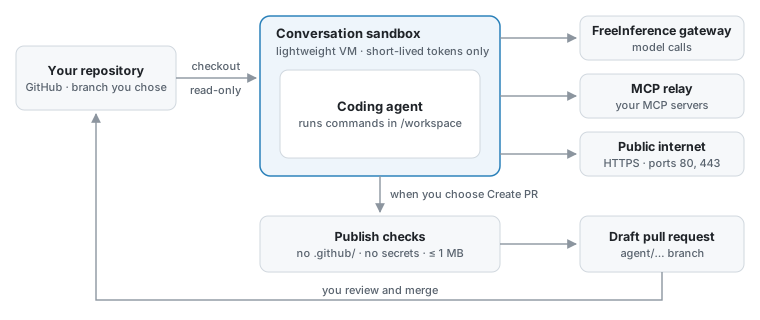
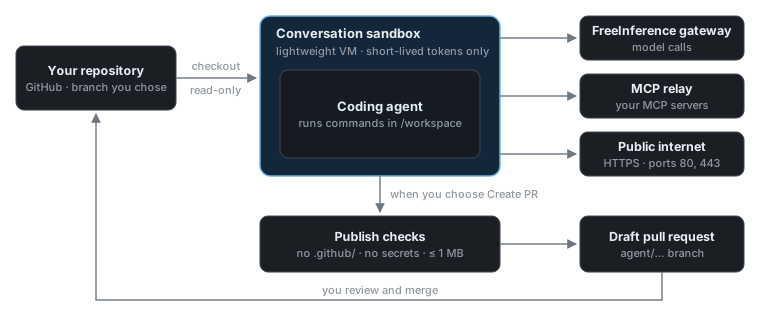
Checkout. The platform clones the branch you chose with a read-only token for that one repository and copies it into the sandbox.
Run. The agent works in the conversation’s own sandbox, a lightweight virtual machine that can reach public websites over HTTPS. It runs commands without asking first; the sandbox is the boundary. The sandbox is kept between turns, so the next message continues with the same files and the same agent session.
Publish, when you ask. A finished turn publishes nothing. Create PR checks the workspace’s changes, pushes them to the conversation’s
agent/…branch and opens a draft pull request. After more turns, Update PR pushes the new changes to the same pull request.Review. Merging stays with you, under your repository’s GitHub rules.
The agent also gets a short-lived GitHub token for the task’s repository, so it can push and open pull requests itself when you ask it to. Those pushes skip the platform’s checks; see What gets published.
Where to go next
If you want to |
Read |
|---|---|
Connect GitHub and run a first task |
|
Follow up, queue messages, stop, fork, set a goal or review a PR |
|
Find conversations, move through a long one, and follow subagents |
|
Choose an agent, a model and a reasoning level |
|
Work without a repository |
|
Install dependencies and pass variables and secrets to every task |
|
Give the agent tools, skills, plugins, memory or your own servers |
|
Know what the sandbox can reach and what gets published |
Usage
Agent tasks use your FreeInference account. Every model call an agent makes — plus one short call that names a new conversation, and any Rewrite prompt you ask for — counts toward your account’s daily usage quota, like your other API traffic. There is no separate per-task budget: an agent keeps using your quota until its turn ends, you stop it, or the quota runs out. A goal keeps starting rounds until it is done.
My Settings → Usage shows your containers with their current CPU and memory use and limits, and what your work has used by day: model cost, tokens and container running time. The cost is an estimate, not a bill. Days start at 00:00 UTC, when the daily quota resets.
Troubleshooting
“Agent access required”
Cloud Agents are in beta and enabled per account, and yours is not enabled yet.
A repository is missing from the picker
The picker lists repositories that the FreeInference GitHub App can access and that you can push to. Choose Configure repository access at the bottom of the picker to give the App access on GitHub, then Refresh. If you cannot push to the repository, you need write access to it first.
The task stays queued
A turn waits while an earlier turn of the same conversation runs, and while every sandbox host is busy. If it waits much longer than usual, stop it and try again later, or with another model.
“We couldn’t reconnect this chat”
The platform lost the agent’s session, for example because the machine running its sandbox failed. The conversation cannot take more messages. Review its changes in the workspace pane, publish them with Create PR if you want them, and start a new chat to continue.
Create PR fails or is refused
Create PR is available once the running turn finishes. A refused
publication says why: usually a change under .github/, something that looks
like a secret, a change larger than 1 MB or 200 files, or someone else pushing
to the agent/… branch — see
What gets published. The next
Create PR includes the same changes, so ask the agent to remove what was
refused first, or make that change yourself.
A plugin stops the task from starting
Plugins are installed before the agent starts, and a failed installation stops the turn with an error. Check the plugin’s name and source, or start a new task without it. See Plugins.
See also
Available Models — full model catalog
IDE & Coding Agent Integrations — run the same models interactively in your IDE